Group Customers Into 3 Buckets
VIP spenders, at-risk lapsers, and first-order-only buyers; know who they are before you message them.
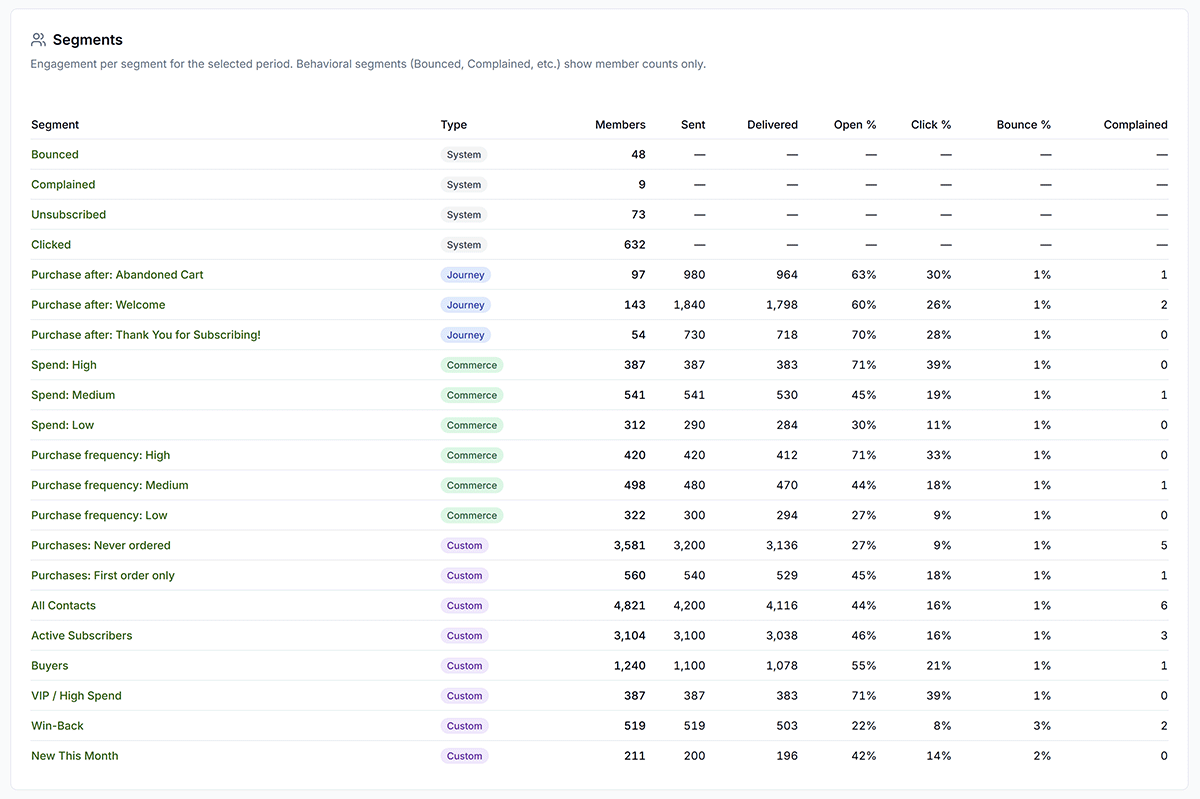
Get Shouting automatically creates commerce segments from order data; no manual sorting. If segments are new to you, start with What Are Segments?. Then map VIPs, at-risk buyers, and one-and-done customers to the segments below.
Why It Matters
Different customers need different messages; buckets make that automatic.
What to Do
- VIPs: Spend: High: reward and upsell your best customers.
- At-risk: Purchase frequency: Low: win-back before they churn completely.
- One-and-done: Purchases: First order only: nurture toward a second order.
- Pro/Agency: add a custom has-not-ordered-in-90-days segment for tighter win-back targeting.
Copy / Template You Can Steal
Three buckets → Get Shouting segments:

VIPs (high spenders) → Spend: High
At-risk (lapsing) → Purchase frequency: Low
One-and-done → Purchases: First order only

Custom 90-day inactive → Create Segment (Pro/Agency)
Do It in Get Shouting
- Contacts → Segments: view auto-created commerce segments (store required)
- Target VIPs with Spend: High
- Target lapsing buyers with Purchase frequency: Low
- Target first-order discount buyers with Purchases: First order only
- Pro/Agency: Create Segment → Email Segment for has not ordered in 90 days if you need a tighter at-risk rule
Keep in Mind
- Segments update automatically as order data changes: you set rules once.
- Pro and Agency can build custom segments (e.g. no purchase in 90 days) for tighter win-back targeting.
Related How-To Guides
Apply Your Knowledge
Start your free trial and follow along in Get Shouting.
Start Your Free Trial TodayNo credit card required • 14-day free trial • Cancel anytime