Product Navigation
How the Get Shouting app is organized: main navigation, the +CREATE picker, the Campaigns hub, and Analyze tabs.
Main Navigation

After you sign in, the top bar is your home base. Items appear based on your plan and connections.
- +CREATE — Opens the creation picker for Campaigns, Social, Email, SMS, CRM Journeys, and Email Templates (see +CREATE options below).
- Campaigns — Hub for multi-channel campaigns and channel tabs (see below).
- Schedule — Drag-and-drop calendar for organic posts, email, and SMS.
- Analyze — Performance dashboard with up to five tabs.
- Inbox — Comments, mentions, and messages from connected social accounts.
- Contacts — Email and SMS contacts, lists, and segments (Email CRM plans).
- Assets — Shared media library for Shouts, Ads, and email.
- Store — Product catalog when Shopify or WooCommerce is connected.
- Account menu (display name) — Social & Brand Settings, Team, Agency, My Profile, and Billing.
+CREATE
Click +CREATE in the main navigation to open the creation picker. Choose what you want to build; each tile starts a different workflow. Email, SMS, CRM Journey, and Email Template options appear when Email CRM is on your plan.
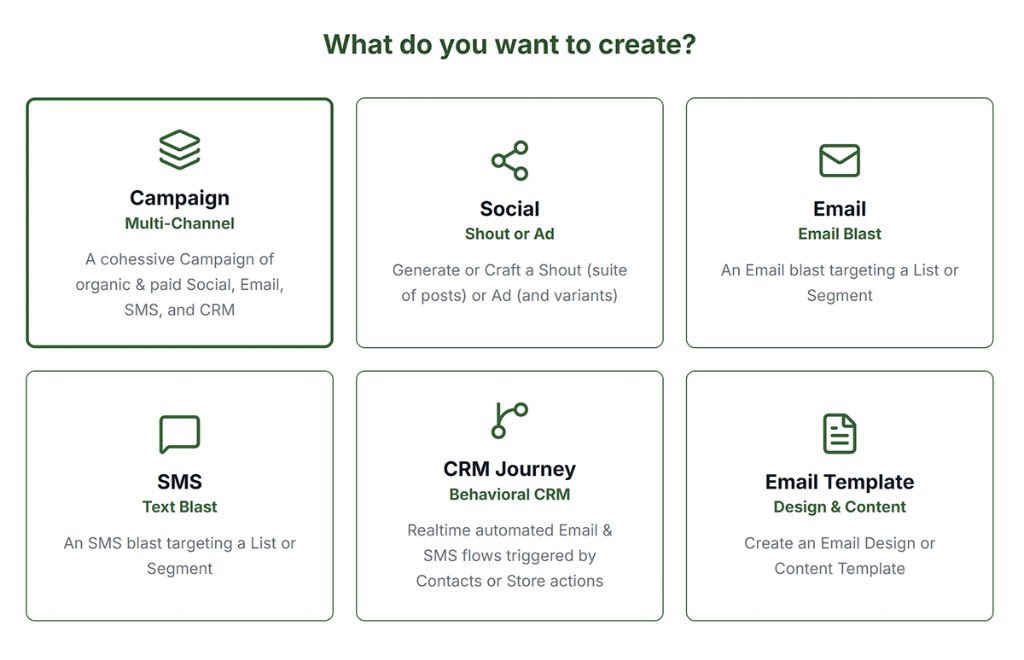
Campaign
Multi-Channel
A cohesive Campaign of organic and paid Social, Email, SMS, and CRM in one guided wizard.
Social
Shout or Ad
Generate or craft a Shout (suite of organic posts) or an Ad (with variants for paid channels).
Email Blast
An Email blast targeting a List or Segment. Compose, preview, and schedule a one-time send.
SMS
Text Blast
An SMS blast targeting a List or Segment. Requires SMS enabled on your Email CRM plan.
CRM Journey
Behavioral CRM
Real-time automated Email and SMS flows triggered by Contact or Store actions (abandoned cart, post-purchase, and more).
Email Template
Design & Content
Create a reusable Email Design Template (layout and styling) or Content Template (copy blocks with merge tags).
Campaigns Hub Tabs

| Tab | What it is | Plan / access |
|---|---|---|
| Campaigns | Multi-channel multi-channel campaigns (Goal → Plan → Build → Schedule) | All plans |
| Organic Social | Draft and published organic Shouts | All plans |
| Paid Social | Sub-tabs: Manage Live Ads (Meta, Google, TikTok delivery) and Materials (ad creatives) | Pro or Agency |
| Email campaign drafts and sends | Email CRM plan | |
| SMS | SMS blast drafts and sends | Email CRM + SMS enabled |
| CRM Journeys | Automated journey workflows | Email CRM plan |
| Design Templates | Reusable email layouts | Pro or Agency (create) |
| Content Templates | Reusable email copy blocks | Pro or Agency (create) |
Analyze Tabs
Open Analyze from the main nav. Tabs depend on plan and connected channels. See the full guide: Analyze Overview.
- Analysis — AI summary (Pro or Agency)
- Campaigns — Multi-Channel portfolio rollup
- Paid Social — Live paid ad metrics
- Organic Social — Organic post analytics
- Email — Email, SMS, and journey metrics