Review Your Segments Monthly
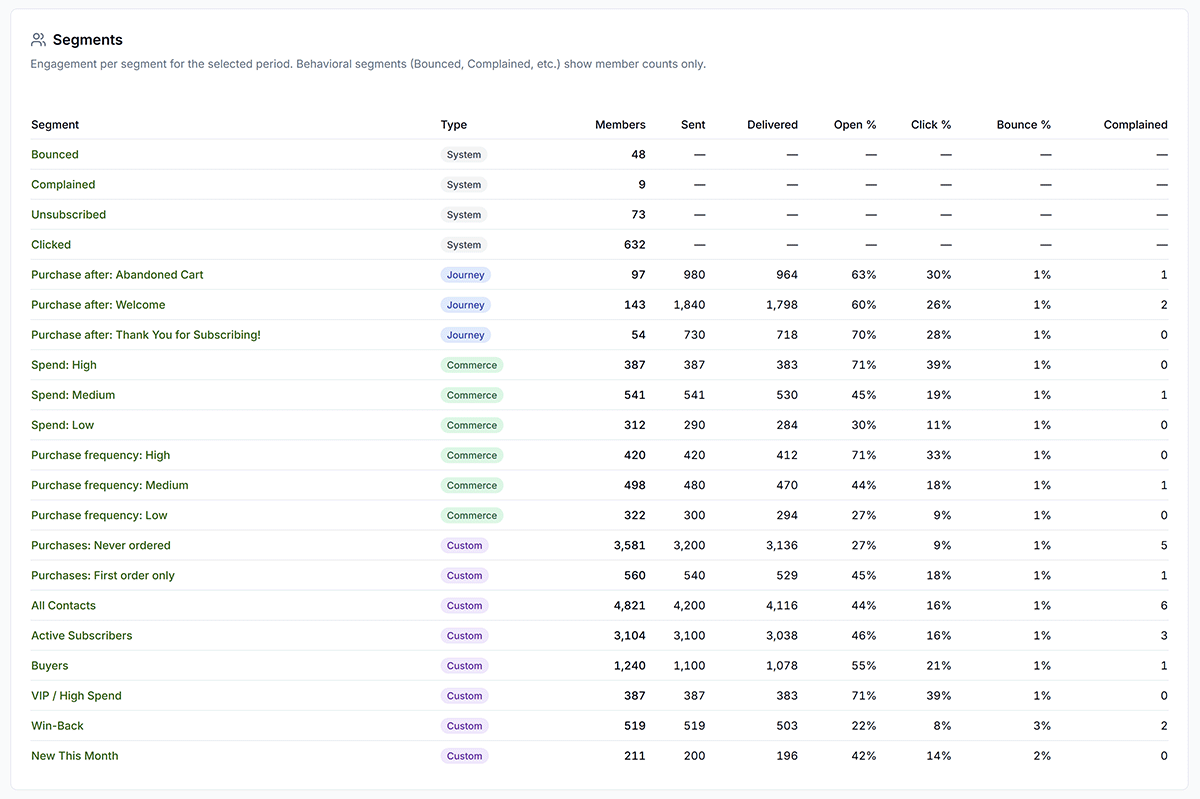
Most Segments are updated automatically, but their sizes shift every month: a five-minute check prevents stale messaging.
Segment sizes shift every month as customers buy, lapse, or churn. Five minutes with Analyze and Contacts → Segments prevents stale messaging.
Why It Matters
Segments that made sense last quarter may not fit today.
What to Do
- Check segment sizes; growing VIP bucket? shrinking at-risk?
- Read Analyze → Analysis Outliers & Risks for flagged segments.
- Review email open/click trends for recent segment sends.
- Adjust journey or broadcast targeting if a bucket changed.
Copy / Template You Can Steal
Monthly segment review (5 min):

[ ] Analyze → Analysis → Outliers & Risks + Action Items
[ ] Contacts → Segments: note size changes
[ ] Analyze → Email: open/click on recent sends
[ ] Adjust one journey or broadcast target
Do It in Get Shouting
- Analyze → Analysis → read Outliers & Risks + Action Items
- Contacts → Segments → check segment sizes
- Analyze → Email → open/click trends by recent sends
Keep in Mind
- Growing VIP bucket? Consider a loyalty offer. Growing at-risk? Trigger win-back.
- Analysis Action Items (Pro/Agency) flag segments worth attention first.
Related How-To Guides
Apply Your Knowledge
Start your free trial and follow along in Get Shouting.
Start Your Free Trial TodayNo credit card required • 14-day free trial • Cancel anytime