How to Use Automated CRM Journeys
Automated CRM (Customer Relationship Management) Journeys triggered by contact or e-commerce events — welcome series, abandoned cart, post-purchase follow-ups, re-engagement, and more.
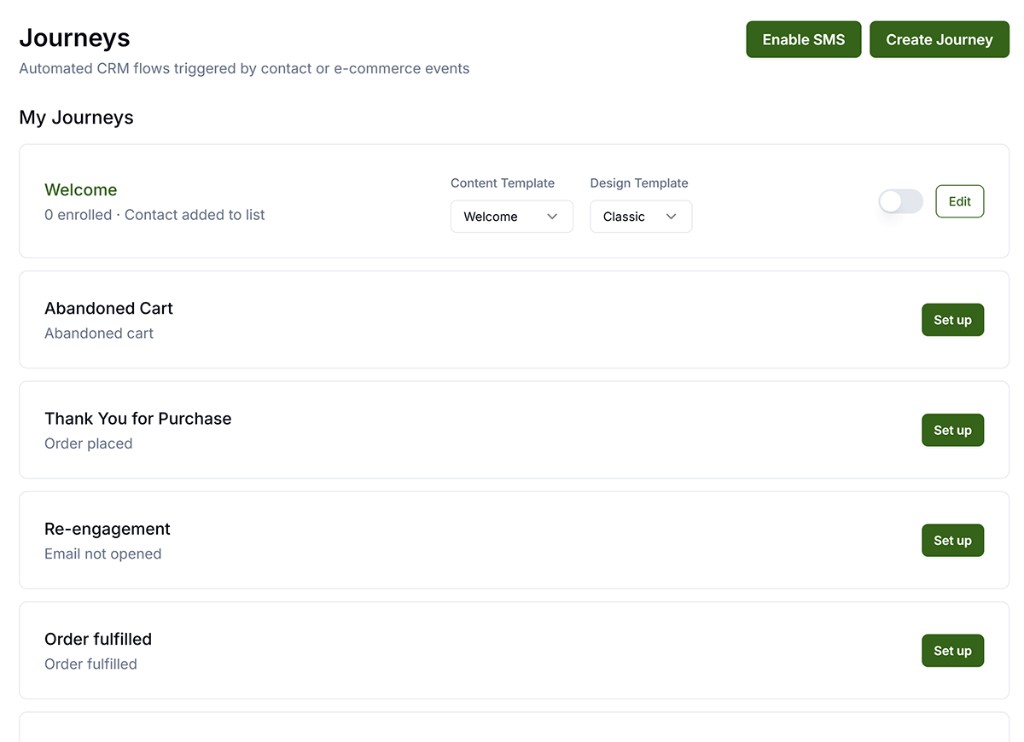
Once your Shopify or WooCommerce store or Email is connected, Get Shouting automatically connects to all the relevant triggers in your ecommerce platform so journeys react to carts and orders. Step-by-step setup: How to Create Automatic Emails.
- Upon connections, you will see the automatic Journeys that are included out of the box.
-
Click the Set Up button to configure the Journey. Basic users can set the Design Template and Content Template to use for the particular Journey. Pro and Agency users can configure and create their own unlimited custom Journeys, as well as unlimited custom Content & Design Templates, and unlimited custom Segments to further personalize their customer Journeys.
How to Use the CRM Visual Journey Builder - That’s it. Your Journey is now live and will automatically trigger based on the triggers and flow you configured.
Welcome series: the built-in Welcome journey sends three emails over four days (immediate, day 2, day 4) when someone joins your list. Step-by-step setup, including how to build a custom multi-day welcome on Pro or Agency: Multi-Day Welcome Series.
Available E-Commerce Triggers
| Trigger | Shopify | WooCommerce |
|---|---|---|
| Order Placed | ✓ | ✓ |
| Order Fulfilled | ✓ | ✓ |
| Abandoned Cart | ✓ | ✓ (plugin v1.1.0+) |
| First Purchase | ✓ | — |
| New Customer Created | — | ✓ |
Notes
- Once your store is connected, your store events trigger realtime automated Journeys so you are always messaging customers in alignment with the Journeys you’ve enabled.
- Abandoned Cart journeys include a direct cart recovery link (
{{cartUrl}}) for both Shopify and WooCommerce. - WooCommerce Abandoned Cart requires the Get Shouting plugin v1.1.0+.
- Respect opt-in and compliance settings for email and SMS in each step.
Related Marketing Academy Lessons
Strategy and context for why these steps matter: