Ensure Emails Are Read
Start with an enticing subject line.
Inbox competition is brutal. On mobile: most clients show 33-50 characters of the subject before cutting off, so the words at the start do the heavy lifting. Pair the subject with a preheader (preview text) that adds context, not a repeat. Industry benchmarks consistently favor short, specific lines over hype; your list may differ, which is why you test.
Personalization and a Hook That Grabs Attention
Personalization works when it feels relevant, not robotic. Merge tags such as {{firstName}} in the subject or preheader often increase opens, but only if the rest of the line still makes sense when a name is missing.
Beyond names, specificity wins: a product, deadline, or “you left X in your cart” beats a generic “Newsletter #12.”
Strong subject lines usually do one of three things: promise a clear benefit (“Your 15% off expires tonight”), spark curiosity with a concrete detail (“The restock you asked for”), or state something timely and true. Skip ALL CAPS, piles of punctuation, and bait that the body does not deliver; those patterns hurt trust and deliverability.
What To a/B Test (and How)
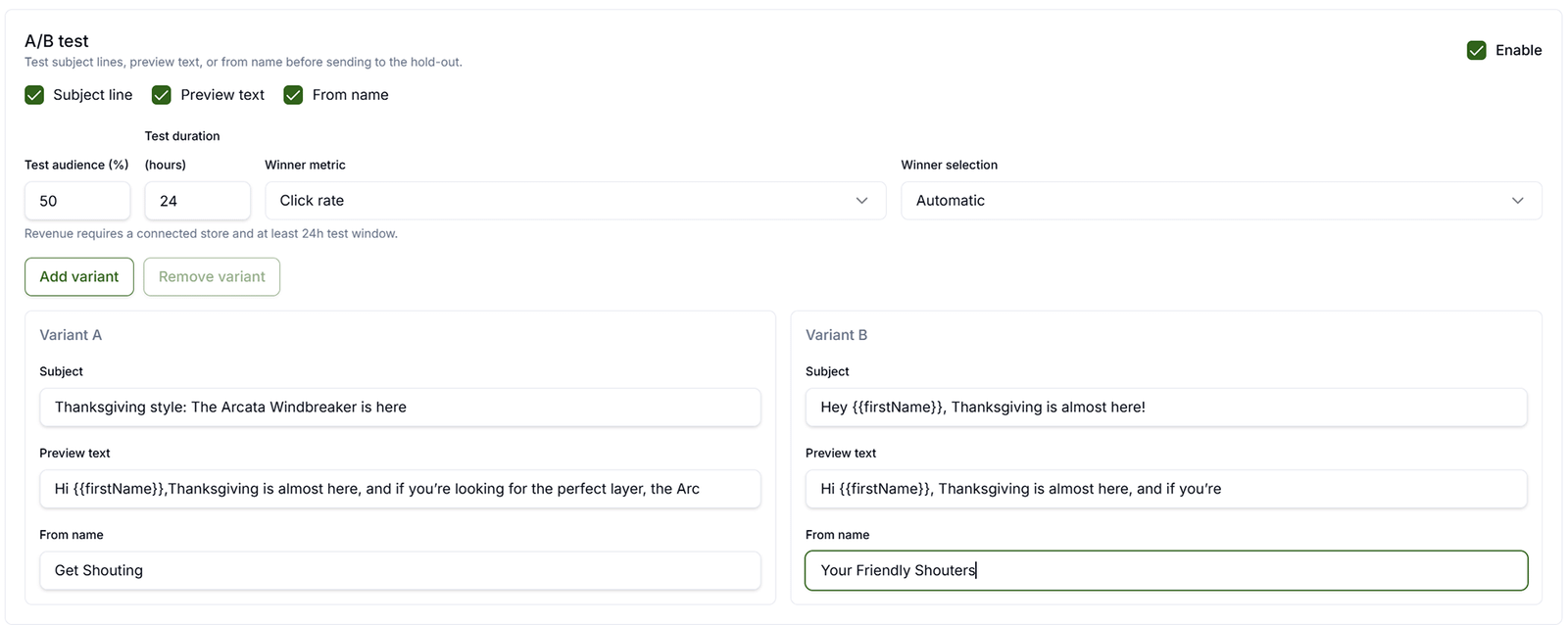
Change one inbox variable at a time while you learn: subject line, preheader, or from name. A good A/B panel lets you run up to four variants on the same email body, set a test audience size and duration, and pick whether the winner is judged by opens or clicks. Common first tests: personalized vs. generic subject; question vs. statement; benefit-first vs. offer-first; short (under 40 characters) vs. slightly longer with the hook still in the first 30 characters.
After the send, compare results in campaign analytics and in Analyze → Email so you build a playbook for your audience, not someone else’s blog post.
Optimal Email Length (Subject, Preheader, and Body)
Subject: aim for about 30-50 characters (roughly 2-7 words); put the must-read phrase in the first 30. Preheader: about 40-90 characters that complement the subject (deadline, offer detail, or intrigue) without duplicating it word for word.
Body: length depends on the job. One-off promotional broadcasts perform best around 50-125 words: one idea, short paragraphs, one primary CTA. Newsletters with several updates can run 200-500 words if each block is scannable. If most opens are on mobile, stay at the low end; if readers need context (B2B, high-consideration products), a bit more copy is fine as long as the offer and CTA still appear before a long scroll.
Why It Matters
Nobody reads an email they never open, and most people decide in a second from the subject and preheader alone. A clear hook plus optional personalization raises your odds; A/B testing and open-rate review tell you what your list actually responds to, since best-practice ranges (like 30-50 characters) are starting points, not guarantees.
What To Do
- Write subject (~30-50 characters) and preheader (~40-90 characters); front-load the hook for mobile.
- Add personalization with merge tags when it fits (e.g.
{{firstName}}); keep copy natural if a field is empty. - Trim promo broadcasts to ~50-125 words in the body; one main CTA.
- A/B test one inbox field at a time (subject, preheader, or from name) when your tool supports it.
- Review open (and click) rates in Analyze → Email; reuse winners on the next send.
Template You Can Steal
Subject + preheader pairs:
Subject: "Your 15% off expires tonight" (34 chars)
Preheader: "Ends at midnight , shop bestsellers before the code disappears"

Subject: "Hi {{firstName}}, your restock is here"
Preheader: "The [product] is back in stock in your size"

A/B ideas (same body, one change):
A: "Ready for summer? 20% off sandals"
B: "20% off sandals , this week only"
Winner = higher open rate after equal send time

Avoid: "AMAZING SALE!!! OPEN NOW!!!"
Do It In Get Shouting
- +CREATE → Campaign (see Create a Multi-Channel Campaign): set what you’re promoting, a URL, product, product line, or promote picks (a set of URLs or products); include Email in channels → Create Materials generates emails with subject, preheader, and A/B options to review before you approve
- For a one-off blast without the full campaign wizard: +CREATE → Email or Campaigns → Email → Create; pick a segment and write or Generate from a URL
- In the Email Editor, set or refine Subject and Preheader; use M merge tags in either field when personalizing
- Standalone blasts: enable A/B test below subject/preheader when available; choose fields to test, variants, test audience %, duration, and winner metric (see Email Campaigns → A/B Testing). Multi-channel Campaign emails already include generated A/B variants to edit
- After sends, open Analyze → Email to compare Open Rate (and clicks) by campaign and variant
Keep In Mind
- Test personalization on your list; relevance beats inserting a name into a weak line.
- One A/B variable at a time gives clearer lessons than changing subject and preheader together.
- Long newsletters are fine if scannable; promos should still be short with one CTA above the fold on mobile.
- Avoid spam triggers: ALL CAPS, excessive punctuation, misleading hooks.
Free In-App Guide
Implement as you go in the app. Sign in, open Account → My Profile → Start Marketing Academy and turn on Marketing Academy for the Ecommerce or General track. Email and in-app reminders will walk you through each step. See Use the In-App Marketing Academy.
Related How-To Guides
Next Up
In the next chapter, we'll be talking about how to Get Compliant Before You Send. A single non-compliant text can cost real money; set up TCPA and opt-in before your first send.
Apply Your Knowledge
Start your free trial and follow along in Get Shouting.
Start Your Free Trial TodayNo credit card required • 14-day free trial • Cancel anytime